Outsourcing IT maintenance for SMEs: scope, SLA, and methodology
Outsourced IT maintenance for SMEs: scope-equivalent comparison of in-house and provider models, contractual SLA terms, and maintenance methodology.

Why IT maintenance cannot remain an afterthought
For an SME of 10 to 50 employees, IT maintenance is rarely structured. Updates fall behind, backups are not tested, and the day a failure occurs, everything stops. The issue is not whether you need maintenance — it is choosing between managing it in-house (with SME-level resources) or entrusting it to a specialized provider.
This article offers a concrete comparison of both approaches: budget, service level agreements (SLAs), and the difference between preventive and corrective maintenance. If you are wondering whether your SME needs a broader IT support framework, check out the 5 signs it is time to switch to managed IT.
Preventive vs corrective maintenance: the distinction that changes everything
Before discussing budget, you need to understand the fundamental difference between the two maintenance approaches.
Corrective maintenance is the default mode for most SMEs: wait until something breaks, then call someone. This is the “firefighter” model. The problem: every intervention is an emergency, billed at a premium rate, with an unpredictable timeline.
Preventive maintenance anticipates failures before they occur. It includes:
- Regular patching (Windows security updates, network firmware, line-of-business applications)
- Hardware health monitoring (disk temperature, storage space, memory)
- Scheduled backup tests — not just checking that “it is running”
- Proactive hardware replacement for end-of-life equipment (a workstation older than 5 years is a risk)
- Continuous infrastructure documentation
The cost difference between the two is well documented. According to Gartner, preventive maintenance reduces unplanned outages by 30 to 50% and extends hardware lifespan by 20 to 30%. For an SME, that means fewer business interruptions, fewer emergency invoices, and a more reliable fleet.
An outsourced IT maintenance contract can add preventive work, monitoring and documentation. For ECLAUD IT, the actual systems, schedules, responsibilities and reporting obligations are those stated in the agreement.
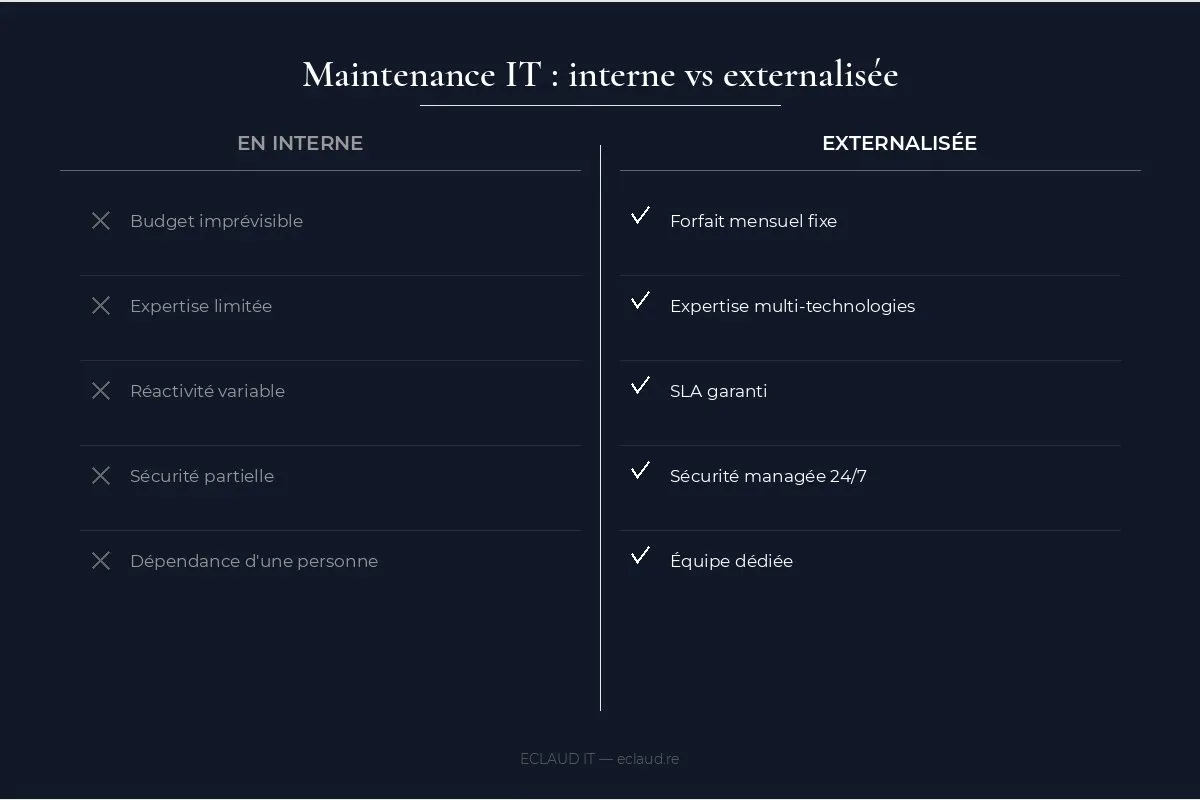
Budget comparison: in-house vs outsourced maintenance

This is the central question. Use the organisation’s actual invoices, internal time and incident history, then compare them with a provider proposal covering the same environment and hours.
In-house management (no dedicated IT person):
- Documented internal time spent on IT
- Actual ad hoc intervention invoices
- Hardware purchases and emergency replacement costs
- Measured incident and productivity impact
- Tools, licences, training and coverage gaps
Outsourced maintenance proposal (same environment):
- Recurring fee and price-adjustment conditions
- Included assets, updates, monitoring and support hours
- Usage limits, project work and out-of-scope billing
- On-site service area, travel and escalation conditions
- Contractual SLA targets and exclusions
Do not assume either model is cheaper. Include internal time, tools, training, projects, outages, service hours and risk on both sides before calculating a difference.
Consider a hypothetical accounting firm that suffers a server failure on a Monday morning. The operational impact depends on the available backup, escalation path, service hours and contractual response targets. These elements should be compared before signing rather than inferred from an unsupported case or universal cost figure.
A recurring fee can improve predictability only when usage limits, projects, exclusions and price-adjustment conditions are explicit.
SLA terms: what your contract must include
A maintenance contract without response-time commitments is not a contract — it is a promise. SLAs (Service Level Agreements) define in black and white the response and resolution times based on incident severity.
Example fields to define in an SLA:
| Criticality level | Example | Response time | Resolution time |
|---|---|---|---|
| Critical (P1) | Server down, network down | Contractual target | Contractual target or process |
| Blocking (P2) | Workstation unusable, email down | Contractual target | Contractual target or process |
| Disruptive (P3) | Printer down, occasional slowness | Contractual target | Contractual target or process |
| Standard (P4) | Configuration request, question | Contractual target | Contractual target or process |
Without a contract, scheduling and priorities depend on the accepted work order. Recurring-client priority should not be assumed unless the applicable terms state it.
A comparison should use the actual service proposals: acknowledgement target, remote diagnosis window, on-site service area, travel conditions, escalation and exclusions. A four-hour target only applies when it is expressly written into the selected SLA.
What to check in an SLA:
- Are the response times contractual or “indicative”? Only written commitments count.
- Are there penalties for non-compliance? A good provider accepts accountability with consequences.
- Are coverage hours defined? A “business hours” SLA does not cover the Saturday morning failure.
- Which users, channels and request volumes are included, and how are out-of-scope tickets billed?
What a maintenance contract covers (and does not cover)
A point often unclear for SMEs: the exact scope of the contract. Here is what is typically included and what is not.
Items that may be included when listed in the contract:
- Fleet monitoring and supervision (workstations, servers, network)
- Security updates (OS patching, firmware, antivirus)
- Remote user support (questions, common incidents)
- On-site corrective interventions per SLA
- Daily backup verification and periodic restore tests
- Infrastructure documentation (inventory, network diagram)
- Managed antivirus and EDR
- Monthly report on fleet status
Generally outside scope:
- New hardware purchases (provided on quote)
- Application development or software customization
- Infrastructure migration (Microsoft 365 migration, for example)
- Network cabling or physical infrastructure work
- User training (often available as an option)
The boundary between maintenance and managed IT lies in strategic oversight. Maintenance manages the existing environment — managed IT drives its evolution. To determine which one you need, an IT audit is the starting point.
The key role of a dedicated technical contact

A reputable provider assigns a dedicated technical contact to each client. This is not a detail — it is what makes the difference between an industrial service and genuine support.
The dedicated contact knows your infrastructure, your line-of-business software, your work habits. They know that your ERP crashes when the database exceeds 50 GB, that your accountant still uses a specific Outlook plugin, that your NAS is in the break room and overheats in summer. This contextual knowledge saves time on every intervention.
An ECLAUD IT proposal identifies the technical contacts, support channels, documentation, reporting and hardware-lifecycle activities included for the selected scope.
Maintenance and security: the minimum baseline
77% of cyberattacks in France target small and very small businesses (ANSSI, France’s national cybersecurity agency — comparable to CISA in the US, 2025). Outsourced maintenance provides the first line of defense:
- Regular security updates (patching)
- Managed antivirus and EDR
- Daily backup verification
- Periodic restore tests
An outsourced maintenance contract also provides intervention traceability — useful in case of an incident or audit. Every action is documented, every alert handled is recorded. For SMEs with remote workers, maintenance also covers securing remote workstations.
How to choose your IT maintenance provider?
Not all providers are equal. Here are some concrete criteria for selecting the right partner:
Is the SLA contractually defined? Priorities, service hours, response objectives, resolution process, on-site conditions and exclusions should be written in the contract. Unwritten timelines are not commitments.
Is there a dedicated technical contact? Changing your contact with every call means starting explanations from scratch each time. A contact who knows your infrastructure, your line-of-business software, and your work habits saves time on every intervention.
Is documentation included in the contract? Fleet inventory, network diagram, centralized passwords (in a secure vault), intervention history: this documentation belongs to you. Without it, you remain dependent on your provider even if you want to switch.
Are restore tests scheduled? A provider who does not mention backup testing in their offer is a red flag. A backup without testing is false protection.
Is responsiveness verifiable? Ask for references, read online reviews, ask about actual average response times — not just contractual timelines.
How to make the switch?
Transition effort depends on the existing documentation, access, tools, sites and risks. Any assessment, migration stages, safeguards, deliverables and price are confirmed before work begins; disruption-free deployment is not guaranteed.
Contact ECLAUD IT for an initial discussion. Any assessment scope, price, deliverables and proposal timetable are confirmed before work begins.
For further reading, check out our complete SME IT maintenance guide, learn the difference between maintenance and managed IT, or read the 5 signs it is time to switch to managed IT.
Frequently asked questions
How much does outsourced IT maintenance cost for an SME?
The price depends on the number of workstations and sites, monitored equipment, support hours, included requests, security controls and on-site conditions. The proposal must state the recurring fee, project work, exclusions and approval process for out-of-scope work.
What is the difference between IT maintenance and managed IT?
IT maintenance covers corrective and preventive interventions such as repairs, updates and backups. Managed IT can add monitoring, security management, system administration and broader governance. Service hours and accountability depend on the written scope; maintenance is commonly a subset of managed IT.
Is outsourcing suited for very small businesses (VSBs)?
Suitability depends on reliance on IT, internal skills, security obligations and continuity requirements rather than a universal workstation threshold. A proposal for a small organisation should state the included remote support, updates, backup scope, price and exclusions.
Can IT maintenance be partially outsourced?
Yes. Some companies keep day-to-day management in-house (simple tickets, software installation) and outsource only the technical subjects — security, servers, backups, network. This is sometimes called partial managed IT or IT co-piloting. It is a relevant approach if you already have a competent person internally and want to strengthen high-risk areas without fully delegating.